Loading
Picked upConfirms the driver, then that the truck arrived, loaded and left.
- Driver
- Confirmed Carrier email
- Departed shipper
- 09:42 Driver text
- Your TMS
- Picked up Written
Operations as a service for freight brokers and 3PLs
Haulvoy runs pickup, check calls, delivery and proof of delivery for your brokerage. Our AI assistant, Clantus, does the work, a human desk takes the exceptions, and every update lands in your own TMS.
Now taking design partners for our first pilot. Nothing is written to your TMS until you say so.
How it works
You keep booking and payment, the parts that need your judgment and your relationships. We take the follow-up that fills your team's day.
Confirms the driver, then that the truck arrived, loaded and left.
Check calls on a schedule, ETA watched against the appointment, your TMS kept current.
Confirms arrival and delivery. A late load is flagged so you decide whether the customer hears.
Collects the proof of delivery, checks it matches the load, and attaches it in your TMS.
Illustrative screens. If you already track drivers with a platform, we read its updates instead of messaging drivers.
See it
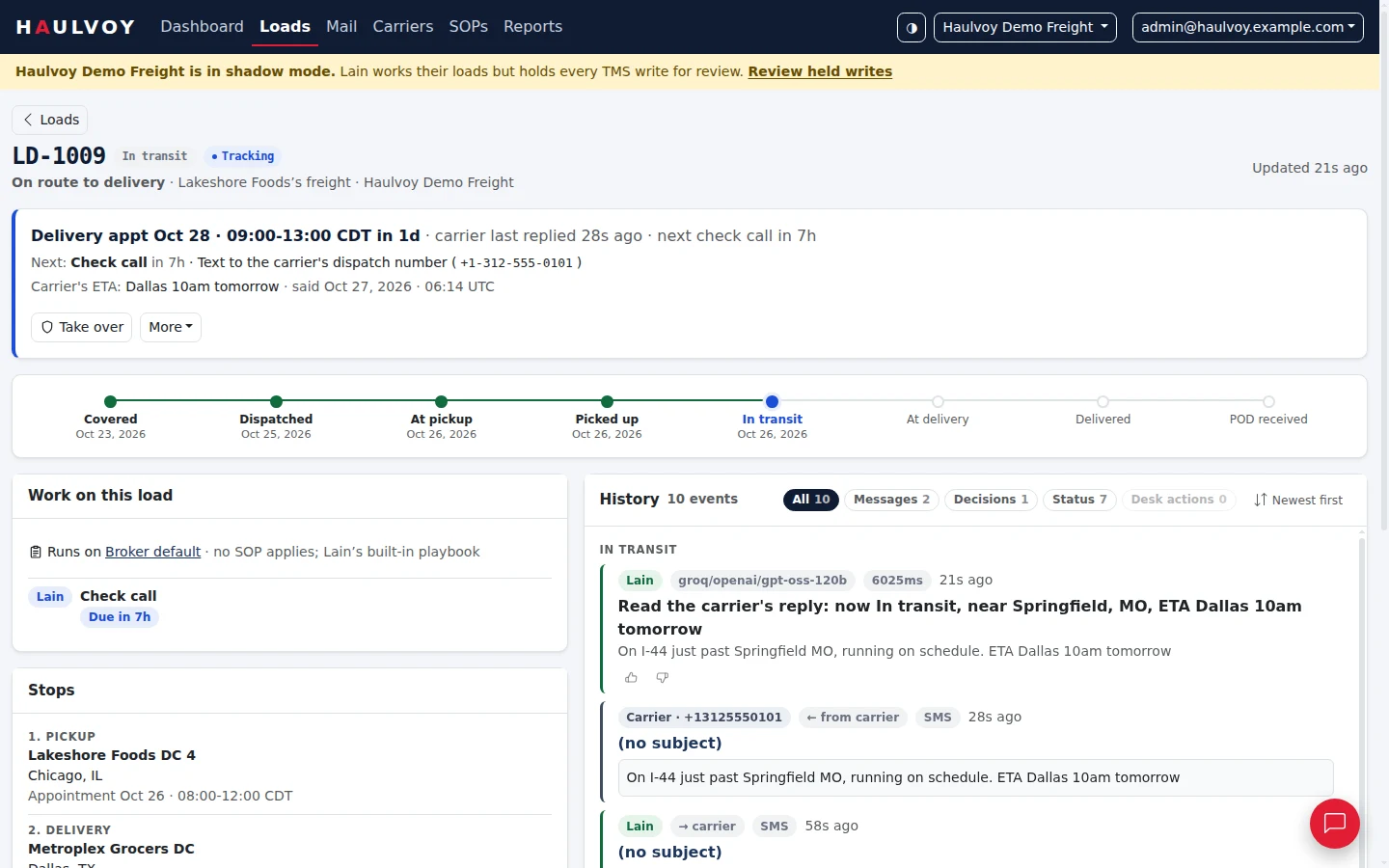
This is our desk's view of a load in a demo with simulated data. A dispatcher texted back, Clantus read it, checked the ETA against the appointment and queued the next check call. The yellow bar is shadow mode: every TMS write is held for review.
Built around how you already work
Every status, note and document is written into the TMS your team already reads, with who did what. No second dashboard to check.
Carriers and customers hear from your brokerage's operations desk, with a line saying an AI assistant is involved. It never pretends to be a person.
Each customer's rules — who to copy, receiving hours, what to report — come from your SOPs. Upload the document; you approve every line before it runs.
A silent carrier, a late truck, a reply that doesn't add up: our desk handles it and brings you only what needs your decision.
Container loads too: delivery orders, last free day, demurrage and per diem watched, empty returns followed up.
Reports show how much of your freight ran itself, what reached a person and how long it waited — exportable for your own review.
The pilot
Clantus works your loads and talks to your carriers, but writes nothing to your TMS and emails none of your customers. You review every update it would have made.
Writes go live for the loads you choose: one customer, a few carriers or one lane.
Every load in the agreed scope. Each stage moves on only with your yes in writing, and one click takes you back.
Pricing
You pay for the loads we manage, not for seats or software. Our first partners help set the price, from their own before-and-after numbers.
Design partner pilot
Priced with you
You stay in control
Your data
Questions
Yes. Messages go out in your brokerage's name, as your operations desk, and every one carries a line saying an AI assistant is involved. Clantus never claims to be a person or signs as one of your employees.
Haulvoy connects to a TMS through one connector per system, behind the same rules. We build the connector for each design partner's TMS. What we need from it is API access that lets an outside tool read your loads and write a load's status.
The pilot starts in shadow mode, so you see every update before any is written. After that, anything unclear goes to our desk instead of being guessed, a wrong status can be corrected with a reason on the record, and one click stops everything.
No. Your TMS stays where your people look; updates, notes and documents land there. Our desk works in its own cockpit, so you don't have to.
Clantus works by email and text, and reads your tracking platform if you have one. The pilot starts on email. There are no phone calls to drivers during the pilot.
We export it to you and delete ours. Our data commitments go into the pilot agreement.
One brokerage, its live loads, shadow mode first. Tell us your TMS and roughly how many loads a week, and we'll show you what Haulvoy would do with them.
hello@haulvoy.ai